





Switch your Direct Deposit with just a few taps.
Direct Deposit
Get paid up to one day early.
A Simpler Way to Set Up Direct Deposit
Your paycheck should be easy to manage. Now it is.
- Skip the paperwork
- Choose where your pay goes
- Save time
- Get paid sooner
Get Paid Early
When you set up direct deposit with RadiFi, you can get paid up to one day early.
Faster Switch
Your direct deposit update is sent digitally to your employer or payroll provider, saving time and effort.
Your Paycheck, Your Way
Say goodbye to manual account transfers. Control where your money goes across your RadiFi accounts.
How It Works
Setting up direct deposit only takes a few steps.
Simple Setup Options
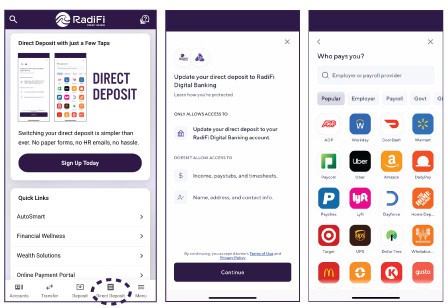
Set up automatically in just a few taps.
✔️Log in to RadiFi Digital Banking and select direct deposit.
✔️Find your payment provider or employer
✔️Follow a few simple steps, and you’re done
Get Paid Up to One Day Early
Get early access to your paycheck when you set up direct deposit.
Frequently Asked Questions
Here are a few helpful things to know before getting started.
It is a secure digital tool that allows you to set up or update your paycheck deposit directly through RadiFi Online and Mobile Banking.
In many cases, you can complete the setup directly through the Direct Deposit feature. However, some employers or payroll providers may require additional steps or processing time.
Log in to RadiFi Online Banking Now
Enroll in RadiFi Digital Banking
Timing depends on your employer or payroll provider. Some updates may be reflected as soon as your next paycheck, while others may take one to two payroll cycles.
Eligible direct deposits may be available up to one day early. Early access depends on when RadiFi receives the deposit information.
Yes. The feature uses a secure, guided process to help you connect to your employer or payroll provider and update your direct deposit information.
In most cases, your next paycheck will be deposited to your RadiFi account after you update your information. However, in some cases, the change may take 1-2 payroll cycles to go into effect. This is dependent on your employer or payroll provider’s payroll cycle.
If your previous direct deposit was with a different financial institution and was set up to deposit a specific amount of your paycheck, you will need to cancel the previous specific amount deposit through your employer or payroll provider. If your previous direct deposit was set up to deposit your entire paycheck or a percentage of your paycheck, you do not need to take any additional steps.
If you are having issues logging in to your employee or payroll account, please contact your employer’s HR department or payroll provider’s Support team. For your privacy and security, RadiFi does not have access to your login information.
Yes, you can. Simply select the percentage of your paycheck you’d like deposited into your first account and click Confirm. Then repeat the process between as many accounts as you’d like. Remember, the total of the percentages you select must add up to 100%.
No, it does not. The Direct Deposit Tool is designed to protect your privacy and only allows access to update your direct deposit to your RadiFi account. It does not allow access to any of your employment, financial, or personal information.
Within the Direct Deposit Switch tool, you have the option to search by your employer or payroll provider. After you’ve made your selection, log in with your employee or payroll information by following the on-screen instructions.
To access the Direct Deposit Switch tool, first log in to your Online Banking account or RadiFi mobile app. To find the Direct Deposit Switch tool in Online Banking, navigate to the Top menu, then select Manage Direct Deposit. To find the Direct Deposit Switch tool in the RadiFi mobile app, select Direct Deposit from the menu located in the bottom bar of the app.
Take Control of Your Paycheck
Set up direct deposit, manage your money, and access your RadiFi accounts anytime through Online and Mobile Banking
Disclosures
*Early access to direct deposit funds depends on when RadiFi receives deposit information from the payer. Early availability is not guaranteed and may vary by employer, payroll provider, payment instructions, and processing timing. Direct deposit changes may take one to two payroll cycles to take effect.